

Release note Software version 5.23.x (JA)
日本語訳:リリースノート ソフトウェアバージョン 5.23.X ※対象機種: e-Series および UR-Series
PolyScope X 最新版リリースノートについては Release note Software version 10.10.x をご参照ください。
リリース日: 2025年8月28日
ソフトウェアダウンロードはこちら
SW 5.23.0 リリースノート
リリースバージョン:
- UR ソフトウェアアップデート: 5.23.0
- URCap Software Platform:
- URCap API: 1.18.0
- URSim Linux: 5.23.0
- URSim Virtual Machine: 2.2.x
- ユーザーマニュアル: 5.23.0
主な新機能
- ツール接触時のしきい値(Force Threshold)のユーザー設定
- パレタイジングにおける到達不可位置の表示
- 初期セットアップ時のティーチングペンダント選択
- 新規インストール時のデフォルトモーションバージョン設定
- ジョグ操作の改善
- ダイレクトトルク制御
PolyScope GUI
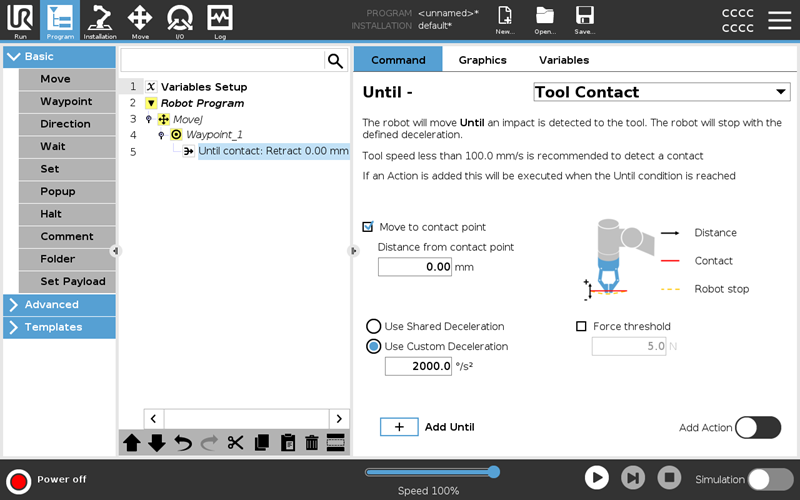
「接触するまで」ノードに Force Threshold(力のしきい値)オプションを追加
「接触するまで」ノードに新たにForce Threshold(力のしきい値)パラメータが追加されました。
これにより、接触イベントとして認識されるために必要な最小の力をユーザーが指定できます。
適切なForce Thresholdを設定することで、特に柔らかい素材や弾性のある対象物との接触検知の精度を高めることが可能です。
一方で、しきい値を高く設定しすぎると、接触を検知する前に保護停止が作動するリスクがあるため注意が必要です。
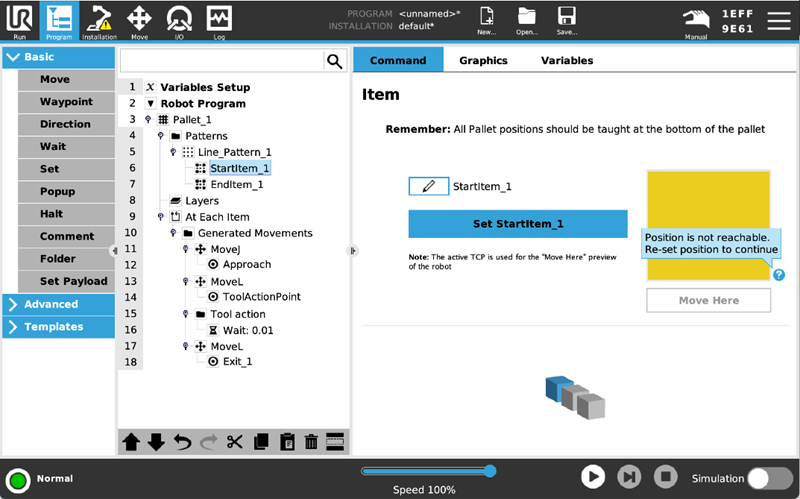
パレタイジングにおける到達不可位置の表示
パレットノード内でアイテムがロボットの可動範囲外にある場合、「Move Here(ここへ移動)」コマンドの3D表示が黄色で表示され、その位置にアクセスできないことを明確に示すようになりました。
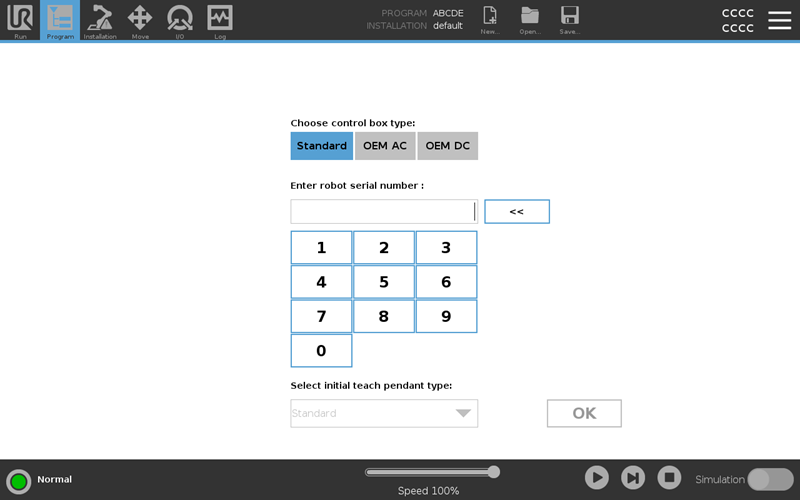
初期セットアップ時のティーチングペンダント選択
システム構成でシリアル番号を入力する際に、接続するティーチングペンダントを変更できるようになりました。
これにより、初期セットアップ時にティーチングペンダントが未接続の状態でも、スムーズにシステム設定を進められるようになっています。
新規インストール時のデフォルトモーションバージョン
PolyScope ソフトウェア バージョン 5.23.0 以降、新規インストール時のデフォルトは Motion Version 2 になります。
e-Series、UR20、UR30 の各ロボットでは、以下の手順で Motion Version 1 に戻すことが可能です。
Installation → Motion Settings → Motion Version
なお、Motion Version 2 はソフトウェア バージョン 5.22.0 で初めて導入されました。
手動ジョグ操作の加減速特性改善
TCPジョグボタンを使ったロボットの手動操作において、加速度パラメータが調整され、応答性と動作の滑らかさが向上しました。
これにより、位置決め作業などの手動操作時に、よりスムーズで制御しやすい動きを実現しています。
URCap ソフトウェアプラットフォーム
URcap API:
新しいUR8 Long をサポート
- RobotType インターフェース内の RobotModel にUR8_LONGが追加されました。
プラットフォーム/oS
組み込みシステム
- ツール温度測定の取得元が変更されました。従来はツール基板(PCB)上のセンサーを使用していましたが、今後はフォース/トルクセンサーに内蔵された温度センサーから取得するようになります。
コントローラ
- 新しいプログラムの実行開始時、速度比が 0.0 から段階的に上がる方式ではなく、1.0 で開始されるようになりました。これにより、短時間で連続してプログラムを実行する際に発生していた、開始時の速度比が不定になる問題(レースコンディション)も解消されます。
- tool_contact スクリプト関数に調整可能なしきい値パラメータが追加されました。これにより、接触検知に必要な力の変化量を指定可能です。デフォルト値は0で、従来と同じ挙動になります。
- tool_contact(direction=[0,0,1,0,0,0], force_threshold=<float>)
- 新たに以下の RTDE出力チャンネルが追加されました:
- 実際のTCP加速度 actual_TCP_acceleration
- 目標TCP加速度 target_TCP_acceleration
- 電流をトルク換算した値 actual_current_as_torque
- コントローラ起動後のロボットアーム消費電力量 [Wh] actual_robot_energy_consumed
- コントローラ起動後のロボットアームの制動で消散した電力量 [Wh]。制御ボックスへ戻り熱として消費 actual_robot_braking_energy_dissipated
- ※両チャンネルはコントローラ起動時に0へリセットされます。
- 一時停止/再開中に新しいプログラムを受信すると、一度ブレーキ動作を行ってから新しいプログラムを実行するようになりました。
- 起動時に、ブレーキ異常が発生した関節をPolyScopeで特定できなかった問題を修正しました。
- 以下の調整が行われています:
- UR15 のフリードライブ/ティーチモードの微調整
- UR30 の軸ロックフリードライブモードの微調整
新しいスクリプトコマンドが追加されました:
- force_mode_get_damping()
フォースモードの減衰係数を取得 - force_mode_get_gain_scaling()
フォースモードのゲインスケーリングを取得
URSimでの消費電力推定
URSim 上でプログラムを実行する際に、実機と同じように消費電力の推定値を取得可能になりました。RTDEに接続し、次の値を読み取ることで確認できます:actual_robot_voltage, actual_robot_current or actual_robot_energy_consumed
RTDE接続の詳細についてはこちらご参照ください:RTDE ガイド
ダイレクトトルク制御
Direct Torque Control インターフェースにより、500 Hz の周期で各関節に対してトルク指令を直接入力できるようになりました。この機能は教育・研究用途だけでなく、産業分野でのロボット技術革新を支援することを目的としています。各関節の目標トルクを直接制御できるため、独自のインピーダンス制御ループの実装などが可能になります。
新規スクリプトコマンド:
- direct_torque(torque=[0,0,0,0,0,0], friction_comp=<True|False>)
関節トルクを直接制御。毎ステップで呼び出す必要があり、呼び出さない場合は通常の位置制御に戻ります。 - get_mass_matrix(q=[<joint angles>], include_rotors_inertia=<True|False>)
ロボットの質量行列を返します。逆動力学モデルの計算に有用です。 - get_coriolis_and_centrifugal_torques(q=[<joint angles>], qd=[<joint speeds>])
コリオリ力・遠心力の合力トルクベクトルを返します。 - get_jacobian(q=[<joint angles>], tcp=[<tcp offset>])
ヤコビ行列を返します。 - get_jacobian_time_derivative(q=[<joint angles>], qd=[<joint speeds>], tcp=p[<tcp offset>])
ヤコビ行列の時間微分を返します。 - get_target_joint_accelerations()
目標関節加速度を返します。Direct Torque 使用時は目標加速度が与えられない点に注意してください。 - get_actual_joint_accelerations()
関節エンコーダから算出した実際の関節加速度を返します(フィルタなしのためノイズを含む可能性があります)。
バグ修正
PolyScope GUI
- Motion Version 設定画面で文字が切れていた不具合を修正
- 3D 表示で関節が外れて見える問題を修正
- 出力ピンリセットコマンドが拒否された際のログ表示を修正
コントローラ
- UR15 / UR20 / UR30 のベース関節で、特定の厳しい動作時に発生していた保護停止のリスクを低減(タイミングが影響を受ける場合あり)
URCap ソフトウェアプラットフォーム
URCap API:
- Mass オブジェクトでメートル法とヤードポンド法を混在させると入力検証範囲が誤る問題を修正
- API経由で円弧動作を追加した際、一部言語環境でウェイポイントがリンクされてしまう不具合を修正
組込み/安全システム
- URシリーズのパーキング速度を修正し、期待値の速度を維持するように改善
- ブレーキ異常のクリア処理を複数回実行すると異常が解除されない不具合を修正
- ブレーキシステムが正常に動作しているにもかかわらず、誤って C350「クリティカルブレーキ異常」が報告される問題を修正
previous RELEASE NOTES:
- Release Notes Software Version 5.22
- Release Notes Software Version 5.21
- Release Notes Software Version 5.20
- Release Notes Software Version 5.19
- Release Notes Software Version 5.18
- Release Notes Software Version 5.17
- Release Notes Software Version 5.16
- Release Notes Software Version 5.15
- Release Notes Software Version 5.14
- Release Notes Software Version 5.13
- Release Notes Software Version 5.12
- Release Notes Software Version 5.11
- Release Notes Software Version 5.10
- Release Notes Software Version 5.9
- Release Notes Software Version 5.8
- Release Notes Software Version 5.7
- Release Notes Software Version 5.6
- Release Notes Software Version 5.5
- Release Notes Software Version 5.4
- Release Notes Software Version 5.3
- Release Notes Software Version 5.2
- Release Notes Software Version 5.1