

Release note Software version 5.25.x
Applicable for e-Series and UR Series
For latest release notes of PolyScope X, please refer to Release note Software version 10.12.x
For further information please see the PolyScope 5 Software Handbook.
Date of release: March 19th 2026.
Download HERE
SW 5.25.1 Release Notes
Release Versions:
- UR Software Update: 5.25.1
- URSim Linux: 5.25.1
- URSim Virtual Machine: 5.25.1
- User Manuals: 5.25.0
Key Features
- Improved Force Control to work close to singularities
- Improved motion performance for slow movements on newly manufactured UR3e, UR7e, UR12e, UR16e
- 25% better path tracking for e.g. welding movements
- Improved direct torque control
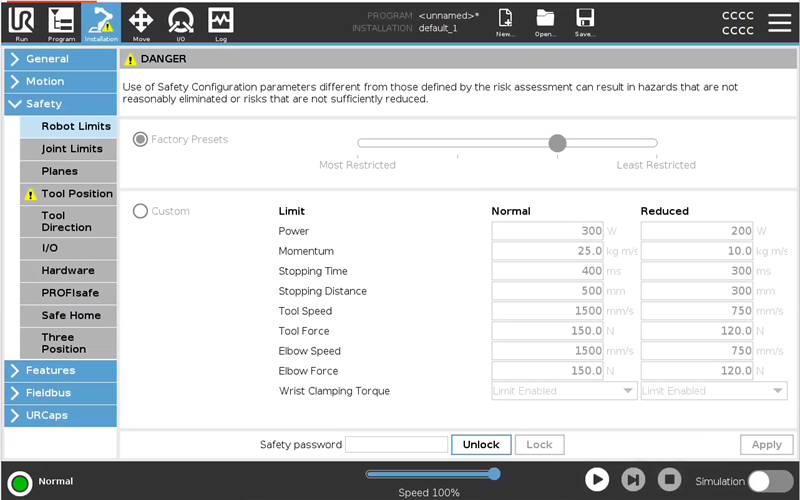
- Safety Settings for Wrist Clamping Torque
Hardware Compatibility and Support
This release introduces firmware support for the updated hardware variants of Joint Size 5. If your robot includes Joint Size 5, you must update to this software version before installing the replacement parts. This applies to:
- UR20 (Joint Size 5)
- UR30 (Joint Size 5)
Direct Torque Control V2
Direct Joint Torque Control enables low-level torque control. This script function must be called at each timestep; otherwise, the robot will revert to position control.
Based on feedback from the Direct Torque Control V1 feature released in versions 5.23 and 10.10, we have made significant improvements to friction and stiction compensation. Additionally, we have provided access to individually scale the viscous and Coulomb friction parameters for each joint. This enhancement offers greater flexibility to adjust the settings according to specific needs.
direct_torque(torque=[0,0,0,0,0,0], viscous_scale=<[0.9, 0.9, 0.8, 0.9, 0.9, 0.9]>, coulomb_scale=<[0.8, 0.8, 0.7, 0.8, 0.8, 0.8]>)
Arguments:
- viscous_scale: This is an array where you can define the scale of viscous compensation from the friction model, within the range [0–1]. This argument is optional. If not provided, the default scale will be [0.9, 0.9, 0.8, 0.9, 0.9, 0.9].
- coulomb_scale: This is an array where you can define the scale of Coulomb compensation from the friction model, within the range [0–1]. This argument is also optional. If not provided, the default scale will be [0.8, 0.8, 0.7, 0.8, 0.8, 0.8].
Deprecated friction_comp argument:
- The old friction_comp argument is still functional and enables the previous friction model. However, if used, a message will be logged the first time a program utilizes this deprecated argument. It will be ignored if any of the new scale arguments (viscous_scale or coulomb_scale) are provided.
Controller
Improved Force control to work close to singularities
-
Updated the integrated admittance controller, used in force control to function close to singularities - fixes issues where the runtime exception “Force mode not possible in singularity” is thrown when the robot is not at a singularity
-
Adjust Force control gains for UR8L and UR18 to match other robots more
Firmware
Improved motion performance for slow movements
-
Improvements affect UR3e, UR5e, UR7e, UR10e, UR12e, UR16e produced in 2026 or newer. Improvements are applicable to some older joints.
Wrist Calmping Torque Limit
Force Limit has a new setting for enabling or disabling Wrist Clamping Torque which is enabled by default.
This safety function limits how much torque the wrist can apply for pushing.
When the limit is enabled, the robot limits torque in the wrist joints to prevent clamping between wrist, payload and the lower arm of the robot.
Not safety rated: This setting also defines an upper limit to the applied torque windows of base, shoulder, and elbow joint. Achievable contact forces may be significantly lower than specified in the Tool Force Limit and Elbow Force Limit.
When the limit is disabled, the robot can use higher pushing force with the wrist joints for e.g. force controlled applications. When disabled, risks of clamping with the wrist, payload and lower arm of the robot should be mitigated by other means.
This safety function has historically been enabled on all robots. From PolyScope 5.25.1 it is possible to disable the safety function.
Bug Fixes
PolyScope GUI
- In automatic mode operators are no longer warned about loaded sub-program having duplicate variable names.
- Improved handling of flight report generation and fixed a bug where the SD card appears full despite sufficient free space.
- Security fixes
Controller
-
In the RTDE interface, fixed an issue where the time_scale_source output always reported 1, even when the robot speed was reduced due to joint speed safety limits. It now correctly reflects the actual source of time scaling.
-
Fixed an issue where the time scaling for robot motion could report an incorrect origin when motion was limited by joint-speed safety limits, improving the clarity of safety-related speed reductions.
-
Fixed an issue where constrained Freedrive could briefly allow unexpectedly high speeds and cause abnormal noises when using low speed slider and TCP speed limits.
Constrained Freedrive now correctly maintains the configured speed limits under all tested safety settings. -
Fixed issue where Modbus server does not reply to any function code request if connection was established shortly after controller start.
- Reduced likelihood of false positive C283A093 faults while performing protective stop.
-
Fixed two issues with synchronized Modbus general purpose register read introduced in SW 5.23:
-
Modbus would fail to read any written values if the controller was initializing the arm or booting and zeroes would be returned instead. It could also delay when writes were applied. The issue typically presents as wrong values read by Modbus as the controller is starting or powering on the arm.
-
If registers were written through Modbus, a subsequent read of a sequence of registers through Modbus in rare cases could be split or delayed, reading only part of the new values and part of the old.
-
Embedded
- Fixed an issue causing false C281A3 faults limited to specific wrist postures while the system is performing normally
Date of release: December 16th 2025.
SW 5.25.0 Release Notes
Release Versions:
- UR Software Update: 5.25.0
- URSim Linux: 5.25.0
- URSim Virtual Machine: 5.25.0
- User Manuals: 5.25.0
Key Features
- Compliance with PROFIsafe standard signals
Safety
PROFIsafe outgoing signals have been inverted for compliance with PROFIsafe standard and general safety standards. This version and all future versions of the software will use active low for PROFIsafe signals (signal value is '0'). Previous versions of PolyScope 5 used active high for PROFIsafe signals (signal value is '1').
Please note that this is a breaking change to all existing field installations of PROFIsafe!
For further details see the User Manual, and the PROFIsafe Update Guide.
URCap Software Platform
Controller
-
The Real-Time Data Exchange protocol input interface hardened. The controller is more strictly checking the input data size and will prevent buffer overflows by disconnecting the client. The recipe ID, frequency and string like inputs are sanity checked and rejected if they contain dangerous characters or out of range values. The RTDE receiver now uses an input rate limiter: it allows 10 messages in a burst, but after this it forces a ~2 millisecond pace time between message evaluation.
-
Velocity scale-down. There are some special scenarios when velocity may be scaled down slightly to avoid robot stops. This happens only if a Safety Force Limit setting is above 250 N and the base joint moves with high velocity, while elbow or tool are near the rotation axis of the base joint.
Embedded
- Improved motion performance at very low speeds (less than 800 µrad/s) and at standstill for shoulder and base joints for UR8L, UR15 and UR18 robots
Bug Fixes
Controller
- Fixed issue in Force mode where user would get Fault C306A003 "Acceleration failed to pass sanity check" when the robot moved into a singularity.
Embedded
-
Reduced the amount of movement allowed during category 2 protective stops, like 3PE stops and safeguard system's stops.
- OSSD signals on configurable outputs 6 and 7 work as expected, producing “low” pulses of 1 ms
Known Issues
- Simulator in some conditions sends additional data packages on RTDE interface.
If requested frequency is lower than 500Hz then up to 9 additional packages are sent in each communication interval. Issue will be fixed in next bugfix release.
Workaround #1: set RTDE communication frequency to 500Hz and decimate packages on the receiver side.
Workaround #2: process only one package in each communication cycle and ignore others.
previous RELEASE NOTES:
- Release Notes Software Version 5.24
- Release Notes Software Version 5.23
- Release Notes Software Version 5.22
- Release Notes Software Version 5.21
- Release Notes Software Version 5.20
- Release Notes Software Version 5.19
- Release Notes Software Version 5.18
- Release Notes Software Version 5.17
- Release Notes Software Version 5.16
- Release Notes Software Version 5.15
- Release Notes Software Version 5.14
- Release Notes Software Version 5.13
- Release Notes Software Version 5.12
- Release Notes Software Version 5.11
- Release Notes Software Version 5.10
- Release Notes Software Version 5.9
- Release Notes Software Version 5.8
- Release Notes Software Version 5.7
- Release Notes Software Version 5.6
- Release Notes Software Version 5.5
- Release Notes Software Version 5.4
- Release Notes Software Version 5.3
- Release Notes Software Version 5.2
- Release Notes Software Version 5.1