Constrained Freedrive Toggle

Description

The Constrained Freedrive Toggle Smart Skill changes which axes are locked in constrained freedrive. It is deactivated by default.

Constrained Freedrive Toggle Smart Skill


Function

This Smart Skill cycles through the freedrive presets you add. You do not need a Three-Position Enabling Device (3PE) when you run this Smart Skill from the Smart Panel.

  1. Go to Application and tap Smart Skills.

  2. Find Constrained Freedrive Toggle under the deactivated Smart Skills, tap the kebab icon, and select Activate.

  3. Tap the plus icon on the main screen.

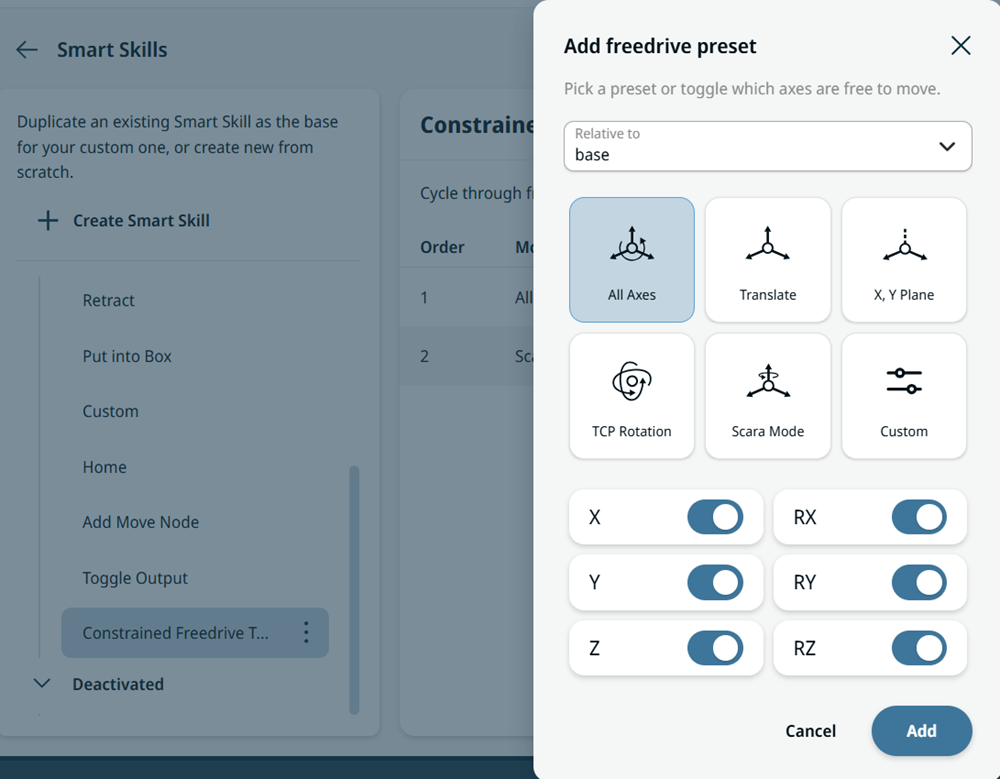
  4. In the Add freedrive preset dialog, select a preset or toggle which axes are free to move.

Add Freedrive Preset Dialog