PROFIsafe

Description

The PROFIsafe network protocol (implemented as version 2.6.1) allows the robot to communicate with a safety PLC according to ISO 13849, Cat 3 PLd requirements. The robot transmits safety state information to a safety PLC and receives commands to reduce safety limits or trigger a safety-related function such as an emergency stop.

The PROFIsafe interface provides a safe, network-based alternative to connecting wires to the safety IO pins of the robot control box.

PROFIsafe is only available on robots that have an enabling license, which you can obtain by contacting your local sales representative. After you obtain the license, download it from myUR.

For information about robot registration and license activation, see Robot Registration and License File.


Advanced Options

A control message that the safety PLC sends to the robot contains the information shown in the following table.

Signal Description
E-Stop by system

0: Asserts the system e-stop.

1: Clear system e-stop.

Safeguard stop

0: Asserts the safeguard stop.

1: Normal operation state.

Note: Also refer to the “Reset safeguard stop” signal description.

Reset safeguard stop Resets the safeguard stop state on a 0-to-1 transition when the “safeguard stop” signal is already set to 1.
Safeguard stop auto

0: Asserts safeguard stop if the robot is operating in Automatic mode.

1: Normal operation state.

Safeguard stop auto shall only be used when a 3-Position Enabling (3PE) Device is configured. If no 3PE Device is configured, the safeguard stop auto acts as a normal safeguard stop input.

Note: Also refer to the “Reset safeguard stop auto” signal description.

Reset safeguard stop auto Resets the safeguard stop auto state on a 0-to-1 transition when the “safeguard stop auto” signal is already set to 1.
Reduced

0: Activates the Reduced safety limits.

1: Activates the “Normal mode” safety limits.

The safety system guarantees the robot is within reduced limits less than 0.5s after the input is activated. If the robot arm continues to violate any of the reduced limits, a Stop Category 0 is triggered.

Operational mode

0: Activates the manual operational mode.

1: Activates the automatic operational mode.

If the safety configuration "Operational mode selection via PROFIsafe" is disabled, this field shall be omitted from the PROFIsafe control message.

Advanced Options

A status message that the robot sends to the safety PLC contains the information shown in the following table.

Signal Description
Stop, cat. 0

0: Robot is performing, or has completed, a safety stop of category 0; a hard stop by immediate removal of power to the arm and the motors.

1: Normal operation state.

Stop, cat. 1

0: Robot is performing, or has completed, a safety stop of category 1; a controlled stop after which the motors are left in a power-off state with brakes engaged.

1: Normal operation state.

Stop, cat. 2

0: Robot is performing, or has completed, a safety stop of category 2; a controlled stop after which the motors are left in a power-on state.

1: Normal operation state.

Violation

0: Robot is stopped because the safety system has failed to comply with the active safety limits defined.

1: Normal operation state.

Fault

0: Robot is stopped because of an unexpected exceptional error in the safety system.

1: Robot is not experiencing an unexpected exceptional error in the safety system.

E-stop by system

0: Robot is stopped because of one of the following conditions:

  • A safety PLC connected via PROFIsafe has asserted a system level e-stop.

  • An IMMI module connected to the control box has asserted a system level e-stop.

  • A unit connected to the system e-stop configurable safety input of the control box has asserted a system level e-stop.

1: Robot is not in system e-stop.

E-stop by robot

0: The robot is stopped because of one of the following conditions:

  • The e-stop button of the teach pendant is pressed.

  • An e-stop button connected to the robot e-stop non-configurable safety input of the control box is pressed.

1: Robot is not in e-stop by robot.

Advanced Options
Signal Description
Active limit set

The active set of safety limits.

0: Normal

1: Reduced

2: Recovery

Robot moving

0: Robot is moving. If any joint moves at a velocity of 0.02 rad/s or higher, the robot is considered in motion.

1: Robot is at standstill.

Safe home position

0: Robot is at rest (robot not moving), and in the position defined as the Safe Home Position.

1: Robot is not at rest, or not in the position defined as the Safe Home Position.

Advanced Options
Signal Description
Safeguard stop

0: The robot is stopped due to one of the following conditions:

  • A safety PLC connected via PROFIsafe has asserted the safeguard stop.

  • A unit connected to the safeguard stop nonconfigurable input of the control box has asserted the safeguard stop.

  • A unit connected to the safeguard stop configurable safety input of the control box has asserted the safeguard stop.

1: The robot is not stopped due to a safeguard stop.

Note: Also refer to the “Reset safeguard stop” signal description. PROFIsafe enforces the use of the safeguard reset functionality.

Safeguard stop auto

0: The robot is stopped because it is operating in Automatic mode and one of the following conditions applies:

  • A safety PLC connected via PROFIsafe has asserted safeguard stop auto.

  • A unit connected to a safeguard stop auto configurable safety input of the control box has asserted safeguard stop auto.

1: The robot is not stopped due to safeguard stop auto.

Note: Also refer to the “Reset safeguard stop auto” signal description. PROFIsafe enforces the use of the safeguard reset functionality.

3PE stop

0: The robot is stopped because it is operating in Manual mode and one of the following conditions applies:

  • Any 3PE is pressed to the middle position, and Freedrive input is active.

  • Not all 3PE devices are pressed to the middle position.

1: Robot is not stopped because of a 3-position enabling device.

Operational mode

Indication of the active operational mode of the robot.

0: Disabled

1: Automatic

2: Manual

Reduced

0: Reduced safety limits are active.

1: Normal safety limits are active.

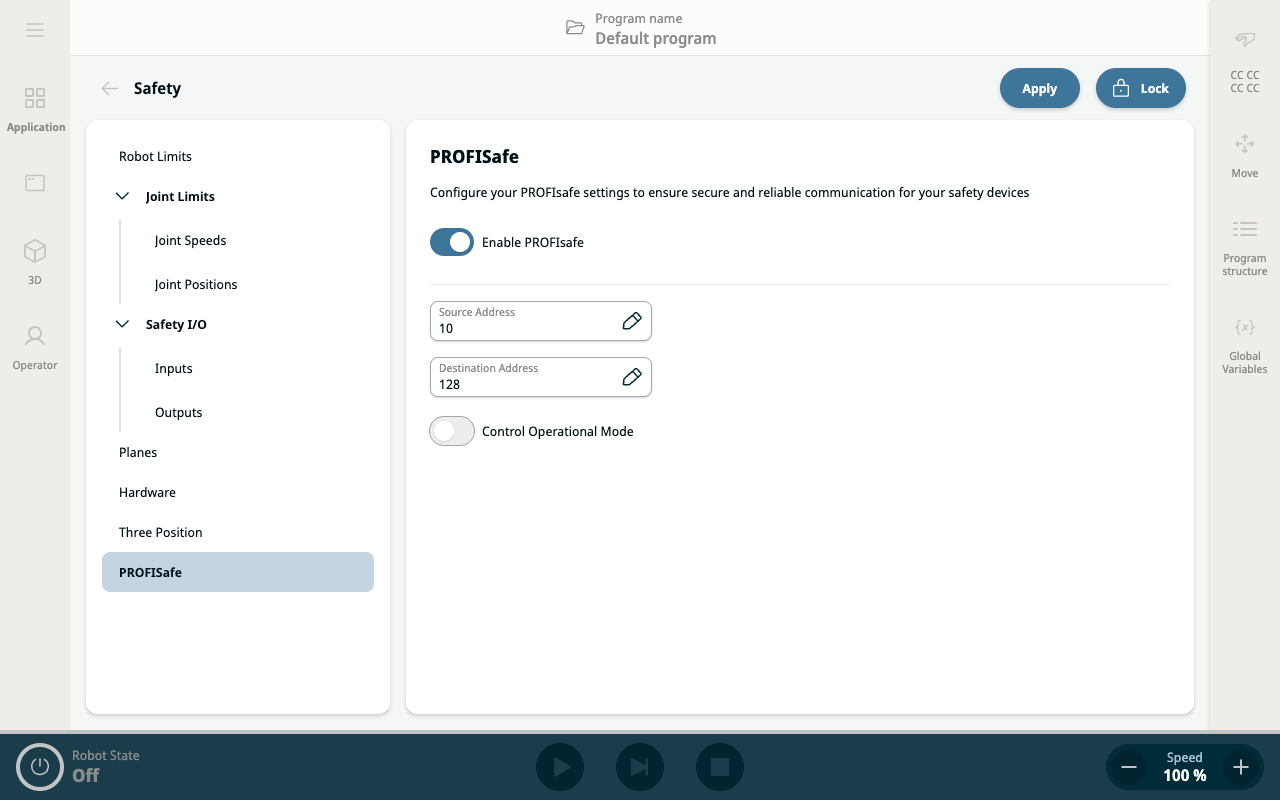
Configuring PROFIsafe
  1. On the Safety application screen, tap PROFIsafe on the left panel.

  2. Tap Unlock on the top right main screen to enable PROFIsafe. Enter the safety password and Confirm.


    The right panel shows two fields and two buttons for configuring PROFIsafe:

    • Enable PROFIsafe button

    • Source Address field

    • Destination Address field

    • Control Operational Mode

  3. Slide right the Enable PROFIsafe button.

  4. Tap the Source Address and Destination Address fields to specify the addresses to be used by the robot and the safety PLC in identifying each other.

  5. By tapping Control Operational Mode, you have the option to enable the PROFIsafe PLC to control the robot operational mode.


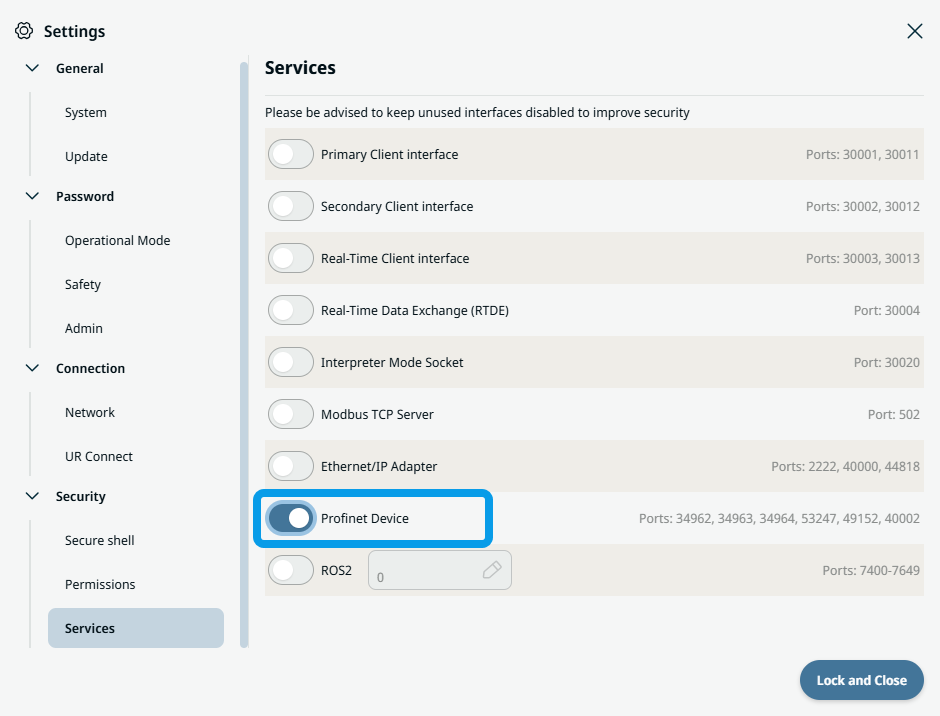
In order to configure and use PROFIsafe, Profinet Device must be enabled in the security services settings menu.

Read for details and interface location PROFINET Device.