TCP Tool

Using the TCP tool

  1. Tap TCP.

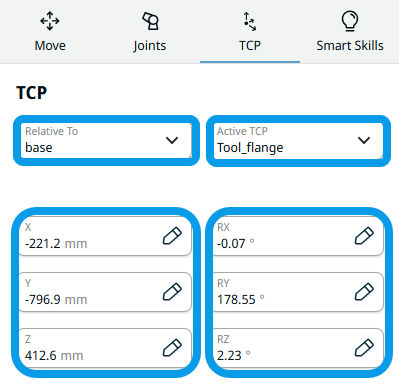
    The TCP screen appears which contains:

    • Relative to field

    • Active TCP field

    • X tab

    • Y tab

    • Z tab

    • RX tab

    • RY tab

    • RZ tab

 
  1. Tap the Relative to field.

    Four choices are given:

    • world

    • base

    • flange

    • tcp

  2. Select the relative position you want the robot to move.

  3. Tap the Active TCP field and select your preference.

  4. Tap the X, Y, Z tabs and RX, RY, RZ tabs and edit the value for each.

    A preview of the robot's position is shown in the robot arm with brown color.

  5. To preview the whole robot arm movement, tap the brown Move Here button below the X, Y, Z coordinate space of the robot arm.