Tool Output

Description

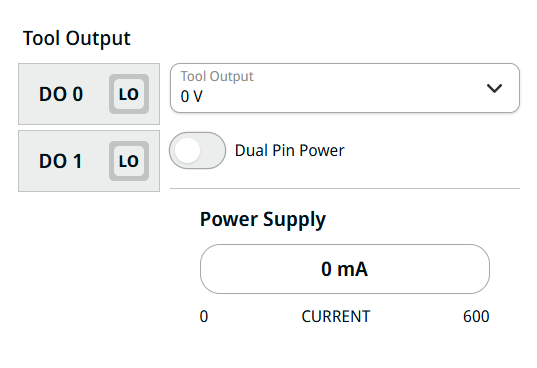
The Tool Output is composed of five fields:

  • DO 0

  • DO 1

  • Tool Output

  • Dual Pin Power

  • Power Supply


To access Tool Output
  1. You can click the square button beside each DO to choose either LO or HI.

  2. Tap DO 0, and three fields appear:

    • Name

    • Action Preset

    • Power Output

  3. In the Name field, create the name and Confirm.

  4. Tap the Action Preset field and nine choices are available.

  5. Choose the pertinent action preset.

  6. Tap the Power Output field, and four choices are available:

    • Disabled

    • Sinking (NPN). When the output is off, the pin allows a current to flow to the ground.

    • Sourcing (PNP). When the output is on, the pin provides a positive voltage source.

    • Push/Pull. When the output is on, the pin provides a positive voltage source.

  7. Choose the pertinent power output.

  8. Repeat the steps for DO 1.

  9. Tap the Tool Output field and choose among the three options available: 0 V, 12 V, 24 V.

  10. Dual Pin Power is used as a source of power for the tool. Tap to enable the Dual Pin Power. The default tool digital outputs are disabled.