| To access Modbus
|
-
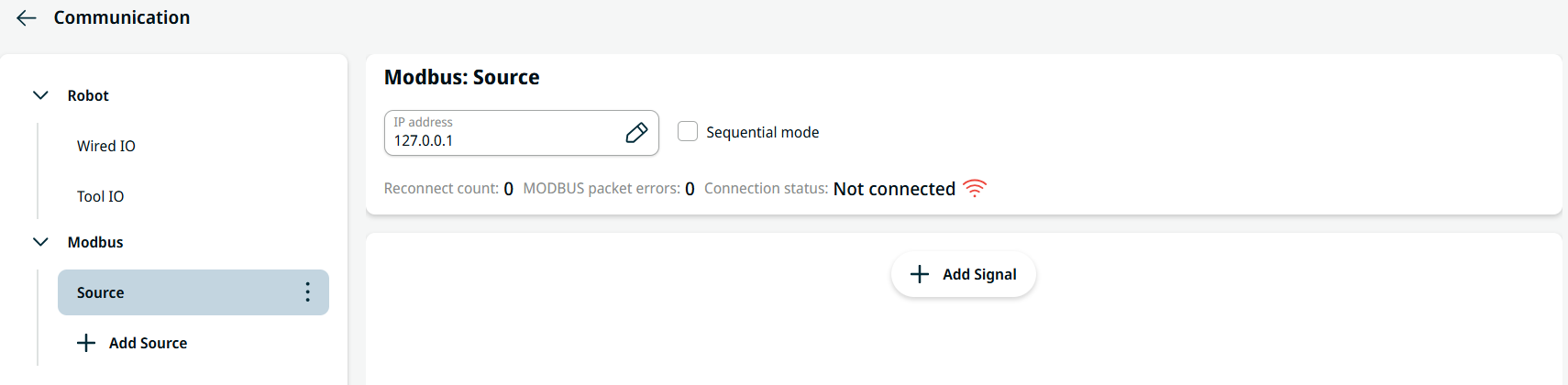
Tap + Add Source under the Modbus tree, and the communication screen shows the Modbus: Source.
-
Tap the IP address field to edit and Confirm.
-
Check the Sequential mode checkbox to force the Modbus client to wait for a response before sending the next request.
-
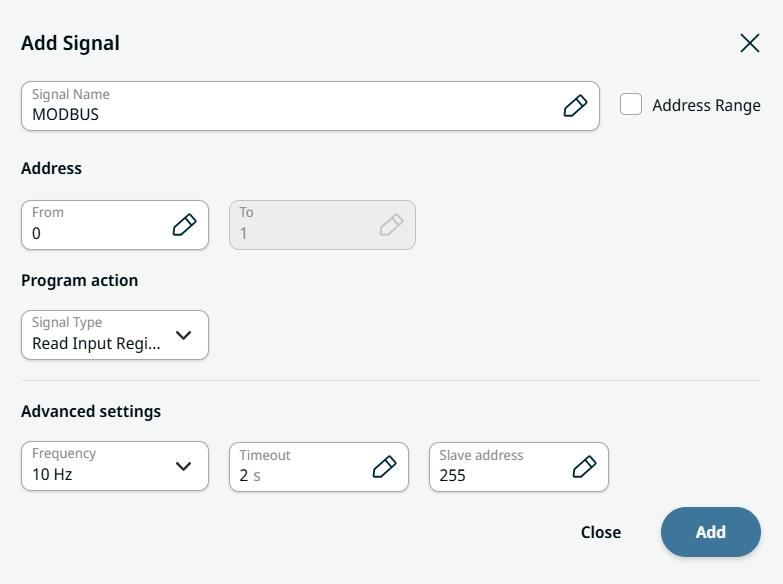
Tap + Add Signal, and a screen appears with these editable fields:
-
Signal Name
-
Address From
-
Address To
-
Signal Type
-
Frequency
-
Timeout
-
Slave Address
|
| |
-
In the Signal Name field, you can edit and Confirm.
-
Check the Address Range checkbox to activate Address To field.
-
Enter the Address From and To respectively, and Confirm.
-
Tap the Signal Type field, and five choices are available:
-
Read Digital Inputs
-
Read Input Registers
-
Read Holding Registers
-
Write Digital Outputs
-
Write Output Registers
-
Choose the pertinent signal type.
-
Tap the Frequency field and choose the pertinent frequency.
-
Tap the Timeout field, enter the value, and Confirm.
-
On the Slave Address field, enter the value, and Confirm.
-
To finish, tap Add on the right bottom part of Add Signal screen.
|