Light Ring

Description

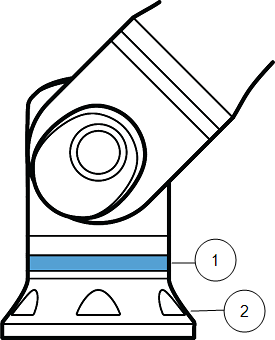
The light ring at the base of the robot arm provides status indication as described in the table below.


You can modify and/or disable the light ring configuration. See the Script Directory for further information.

The color spectrum of the light ring can deviate at the maximum ambient temperature.

Robot base


1 Light ring
2 Base


Color codes
Color Mode
  Steady Flashing slow 0.5 Hz
Red Robot not moving or in the process of stopping.
  1. Emergency stop
 
Yellow Robot not moving or in the process of stopping.
  1. Robot stop (previously known as Protective Stop)
  2. Recovery
  3. Safeguard stop (all types)
 
Green Automatic mode
  1. Running
Automatic mode
  1. Running at reduced parameters
Blue Manual mode
  1. Not Automatic, Not being moved
  2. Booting process
Robot can be moved by hand
  1. Backdrive
  2. Freedrive
OFF No power available to the robot arm
  1. Fault
  2. Violation
  3. Loading Screen
  4. System power OFF


Controlling the light ring via URScript

You can control the light ring behavior using the following script commands:

Command

Description

set_baselight_iec()

Default. Sets the light ring to follow IEC 60204-1 standard colors for safety and operational modes.

set_baselight_solid(r, g, b)

Sets the entire ring to a custom color using RGB values (0–255).

set_baselight_off()

Turns the light ring off completely.


If you use set_baselight_solid or set_baselight_off in a program, the light ring remains in that state even if the program stops or a protective stop occurs. It does not revert to the standard IEC colors until set_baselight_iec() is called again.

The light ring is purely informational and is not safety-rated. Do not rely on the light ring as an exclusive safety indication.