Operational Mode
|
Injury may result from operating the robot at excessive speed in Manual Mode. The suitability of High Speed Manual Mode shall be validated through the application risk assessment.
The speed limit resets to the default after five minutes of inactivity.
|
| To enable High Speed Manual Mode |
|
| Mode Switching |
*If a Three-Position Enabling Device is configured, the robot operates at Manual Reduced Speed unless High Speed Manual Mode is enabled.
|
| Switching Modes |
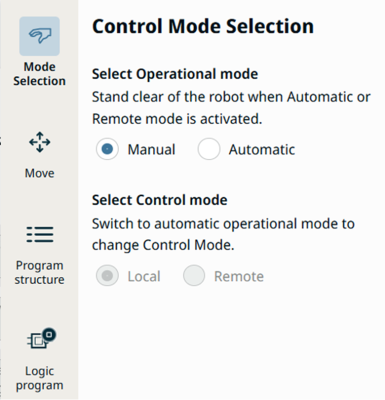
Select the profile icon to display the Mode Selection panel in the Sidebar.
PolyScope X is automatically in Manual Mode when the Safety I/O configuration with Three-Position Enabling Device is enabled.
|
| Select Remote Mode |
You can change remote mode only when the operational mode is set to Automatic. If you change remote mode from Remote to Local, the operational mode automatically returns to Manual.
|
| Operational Mode Switch |
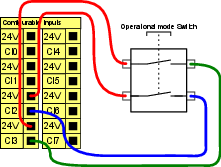
Using a three-position enabling device requires an Operational Mode Switch. The following illustration shows an Operational Mode Switch.
|