

Product alert safety notice for TP with 3PE
The purpose of this message is to provide an alert on the 3PE TP on e-Series robots
To: Universal Robots Customers of the UR Teach Pendant with 3PE (3-position enabling device)
From: Universal Robots Global Technical Compliance
Date: 20 January 2021
Subject: SAFETY NOTICE Universal Robots e-Series robots with software version SW 5.9.3 and SW 5.9.4
Unexpected motion can occur when a robot application is installed with the following combinations ONLY:
• Universal Robots e-Series robot
• Universal Robots software versions: SW 5.9.3 or SW 5.9.4
• Universal Robots Teach Pendant with 3-Position Enabling Device (3PE TP)
• External mode selector switch is connected to the Universal Robots Control Box
The risk due to unexpected motion requires all of the following circumstances:
• Automatic mode is selected on the external mode selector switch.
• No protective device is connected to the Safeguard Stop Input of the Universal Robots Control Box. (For example: when using a perimeter interlocked guard, light curtain, or safety scanner, etc).
• The operator uses the Teach Pendant to switch to manual mode for teaching or programming
• The robot is not moving, but it is capable of moving according to its program/programming.
• The operator moves within reach of the robot/end-effector/workpiece, while holding the Teach Pendant.
The probability of unexpected motion happening is extremely low, because all of the above combinations and circumstance are required. As such, note the following:
• All safety functions are active and functioning properly. This includes the 3PE which is not active when the robot control is in automatic mode.
• The operator is typically more attentive to robot activity due to planned teaching or programming tasks.
• Operator attention is more likely to be directed to the robot application; it is unlikely that the incorrect Teach Pendant mode indication will be noticed.
 |
WARNING: Unexpected motion can occur with Universal Robots A/S software, when programming software 5.9.3 and 5.9.4 with the Universal Robots Teach Pendant with 3-Position Enabling Device (3PE TP), in applications with an external mode selector switch, where the external mode selector switch is set to Automatic.
|
To eliminate the risks associated with this issue, update to software version 5.9.5 or higher. The robot application can remain operational before updating the software ONLY if the external mode selector switch is disconnected from the UR robot control box. With 5.9.3 & 5.9.4, train personnel to only select the mode using the UR Teach Pendant with 3PE. Software version 5.9.5 or higher eliminates this issue and Teach Pendant with 3PE owners are urged to update. As always, proper inspection and maintenance is required as stated in the UR Service Manual.
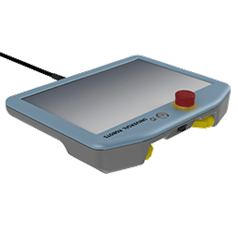
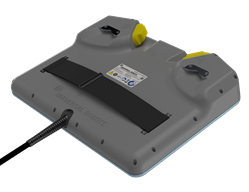
How to recognize the Teach Pendant with 3-Position Enabling Device (3PE TP):
Only the Universal Robots e-Series robots with 3PE TP are affected if an external mode selector is used. The 3PE TP only functions with Universal Robots e-Series robots.
Helpful links
3PE TP support article
How to update software: Service Manual, Chapter 5
3PE TP Installation Guide
 |
If you have any questions about this Safety Notice, you can email questions to: SafetyNotices@Universal-Robots.com to be directed to your regional representative. You can directly contact your regional Universal Robots representative at: https://www.universal-robots.com/about-universal-robots/contact-info
|
Universal Robots A/S, Energivej 25, 5260 Odense S, Denmark
