

URScript: Dynamic Force Control - Polyscope 5
Example is valid for:
PolyScope 5 software version: 5.26.0
Note that older or newer software versions may behave differently.
For CB-series robots (CB2/CB3), see URScript: Dynamic Force Control (CB2/CB3).
All moves grouped under the Force wizard in PolyScope are bound by the force parameters specified in the force command. To control these parameters dynamically at runtime, you need to use URScript. This example shows how to keep a compliant axis aligned with the tool while the tool rotates.
Scripting Syntax
The function to set the force is:
force_mode(task_frame, selection_vector, wrench, type, limits)
where,
task_frame is the reference frame, given as a pose,
selection_vector defines the compliant axes (1 = compliant, 0 = not compliant),
wrench specifies the force (N) and torque (Nm) along and about each axis of the task frame,
type defines how the task frame is interpreted (1 = Point, 2 = Simple, where the frame is not transformed, 3 = Motion), and
limits sets a limit for each axis. For compliant axes it is the maximum speed (m/s or rad/s). For non-compliant axes it is the maximum deviation from the program's position (m or rad).
Example:
force_mode(get_target_tcp_pose(), [0, 1, 0, 0, 0, 0], [0, 1, 0, 0, 0, 0], 2, [5, 5, 5, 5, 5, 5])
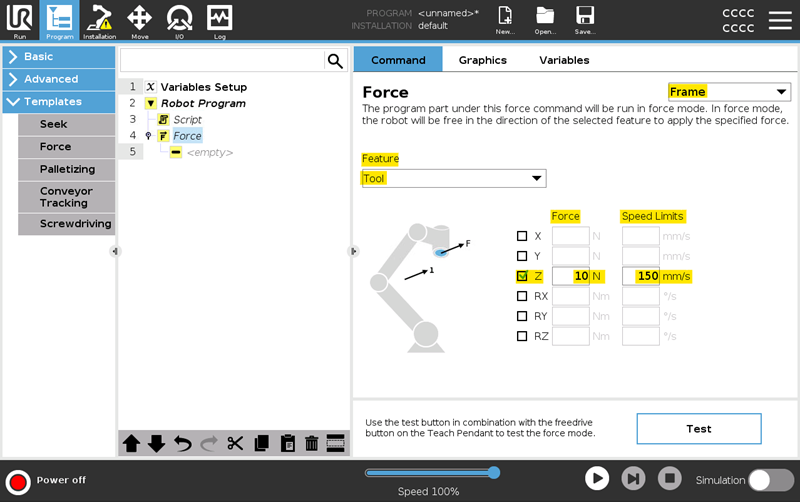
The PolyScope equivalent of the Force settings in the above example would look similar to the screenshot below.
Following the TCP Pose Dynamically
Calling force_mode once fixes the task frame at that moment. To make the compliant axis follow the tool while it moves or rotates, call force_mode repeatedly from a thread, with the frame refreshed on every cycle.
The example below does the following:
- Moves to a start position and waits 3 seconds for the robot to settle.
- Zeroes the force/torque sensor with zero_ftsensor().
- Starts a thread that calls force_mode on every cycle with the current target TCP pose.
- Rotates the wrist (joint 6) for 5 seconds with speedj.
Example:
def follow_tcp_pose_1():
global Waypoint_1_p=p[-.131049999982, -.278397179401, .148844762470, -.000000000322, 3.141592653590, .000000000322]
global Waypoint_1_q=[-1.5707963267948966, -1.7453292519943295, -2.181661564992912, -0.7853981633974483, 1.5707963267948966, 0.0]
global var_1= get_target_joint_positions ()
optimovej(var_1, a=1.0, v=1.0)
optimovej(Waypoint_1_q, a=1.0, v=1.0)
sleep(3.0)
zero_ftsensor()
sync()
thread Thread_1():
while (True):
force_mode(get_target_tcp_pose(), [0, 1, 0, 0, 0, 0], [0, 1, 0, 0, 0, 0], 2, [5, 5, 5, 5, 5, 5])
sync()
end
end
threadId_Thread_1 = run Thread_1()
speedj([0, 0, 0, 0, 0, 1], a=10, t=5)
end
Features
- Specify force control relative to coordinate system
- Specify force control relative to motion
- Define force in single axis or multiple axes
- Limit tool velocity in compliant axes
- Easy testing using the freedrive button (Teach Test + Freedrive)
Specifications
Force and torque precision depend on the robot model. Refer to the technical specification of your robot.