PolyScope X: Input and Output
| Description |
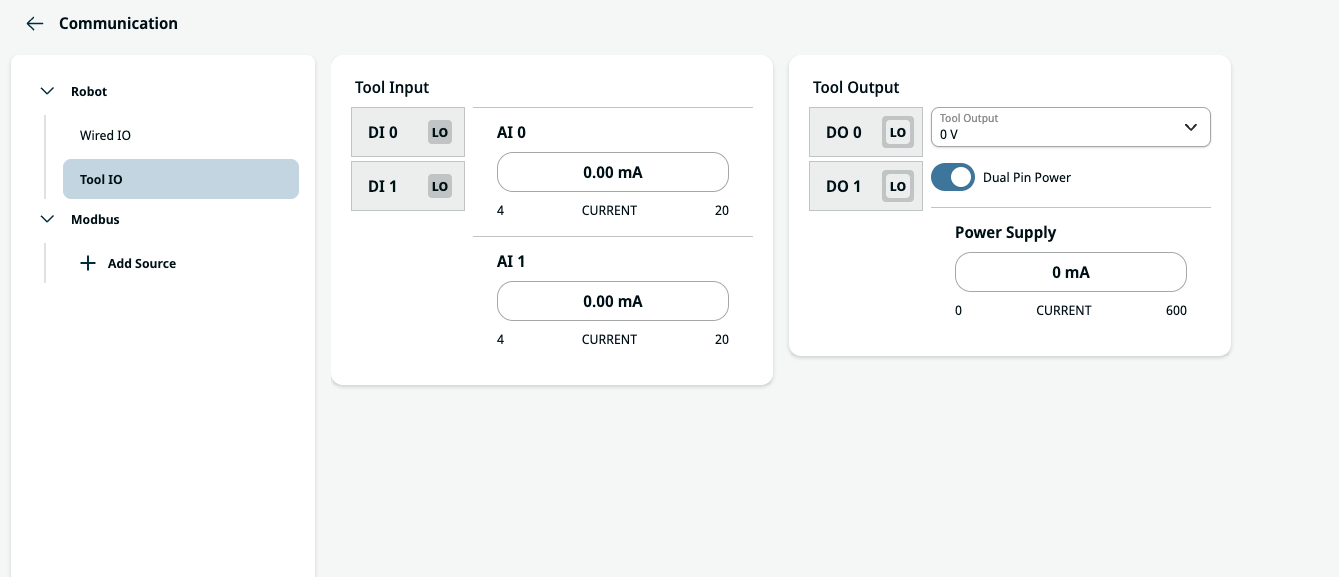
The tool IO tab monitors and sets the live IO signals from/to the Control Box.
|
| Tool Output |
The tool output contains two digital output fields, tool output voltage and power supply current indicator and Dual Pin Power toggle.
After selecting a new output configuration, the changes take effect. The currently loaded installation is modified to reflect the new configuration. After verifying the tool outputs are working as intended, make sure to save the installation to prevent losing changes.
|
| Tool Input |
The tool input contains two digital input (DI) fields and two fields for analog input (AI) currents.
DI fields can be independently configured to action presets:
The AI's can be set from 4-20mA. These settings are persistent over restarts of the robot controller and saved in the installation.
|