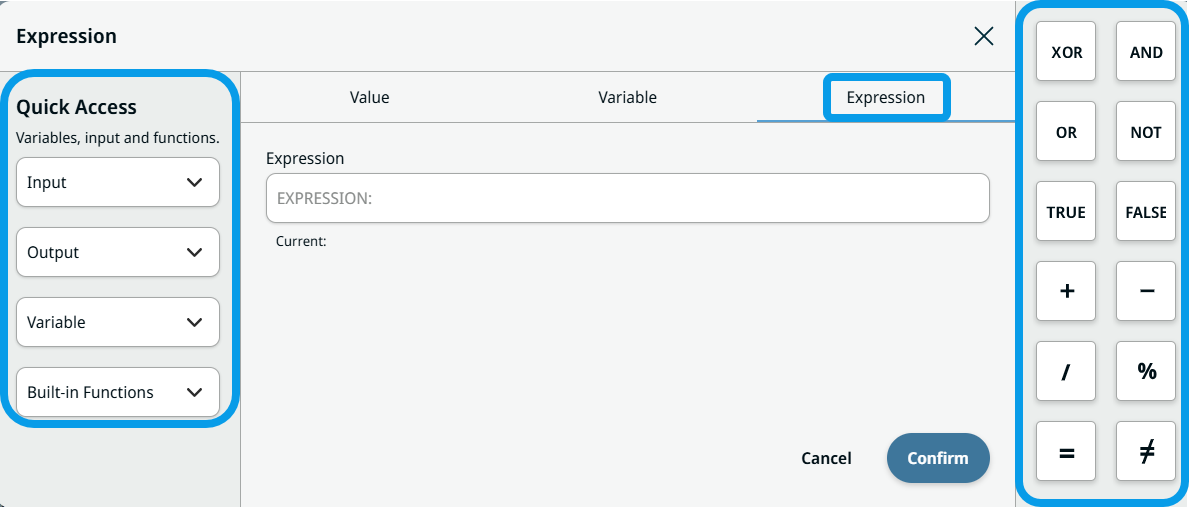
Expression Editor
| Description |
The Expression tab enables you to insert an expression, which should be a valid URScript and evaluates to the correct type. An expression in an If node evaluates to a Boolean. Whereas a String type requires enclosing quotes to be used. Furthermore, the Expression tab allows you to easily insert a variable into the expression.
|
|
Example use of Expression tab |
Create a program loop counter.
|


| Expression Editor |
In the Expression Editor, you can find shortcuts for inserting functions, IOs, and logic operators into expressions. On the left column, you see the Quick Access section that allows you to easily insert an Input, Output, Variable, or Built-in Function at the current cursor position. On the right column are found buttons to insert common logic operators and values, such as AND, OR, NOT, TRUE, FALSE. This functionality has been added to every tabbed into dialog, as well as to few node fields that previously only accepted a string, such as the If node.
|