|
安全须知 |
Universal Robots A/S 明确声明,对于因客户未能严格按照用户手册和服务手册安装、操作和维护机器人,未能根据应用需要对人员进行培训,以及未能遵循和实施本安全须知中的建议而造成的任何及所有损害或伤害,本公司概不承担责任。 |


| To: | Universal Robots Customers of the UR Teach Pendant with 3PE (3-position enabling device) |
|---|---|
| From: | Universal Robots Global Technical Compliance |
| Date: | 20 January 2021 |
| Subject: | SAFETY NOTICE Universal Robots e-Series robots with software version 5.9.3 and 5.9.4 |
|
Unexpected motion can occur when a robot application is installed with the following combinations:
|
|
|
The risk due to unexpected motion requires all of the following circumstances:
|
|
|
The probability of unexpected motion happening is extremely low, because all of the above combinations and circumstance are required. As such, note the following:
|
|
|
Unexpected motion can occur when programming UR e-Series robots using software 5.9.3 and 5.9.4 with the Teach Pendant with 3-Position Enabling Device (3PE TP), in applications with an external mode selector switch, where the external mode selector switch is set to Automatic.
|
|
|
To eliminate the risks associated with this issue, update to software version 5.10 or higher. The robot application can remain operational before updating the software ONLY if the external mode selector switch is disconnected from the UR Control Box. With 5.9.3 and 5.9.4 after removing the external mode selector, train personnel to select the mode using the UR Teach Pendant with 3PE. Software version 5.10 or higher eliminates this issue and Teach Pendant with 3PE owners are urged to update. As always, proper inspection and maintenance is required as stated in the UR Service Manual. |
|
|
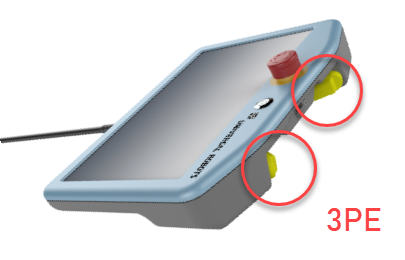
How to recognize the Teach Pendant with 3-Position Enabling Device (3PE TP) Only the UR e-Series robots with software 5.9.3 or 5.9.4 and a 3PE TP are affected if an external mode selector is used. The 3PE TP only functions with UR e-Series robots.
Helpful links: |
|
|
|
If you have any questions about this Safety Notice, you can email questions to: SafetyNotice@Universal-Robots.com It will be directed to the appropriate department. You can directly contact your regional Universal Robots representative at: https://www.universal-robots.com/about-universal-robots/contact-info. |
