| To use the IMMI template
|
- On PolyScope, in the Header, tap Program and select IMMI.
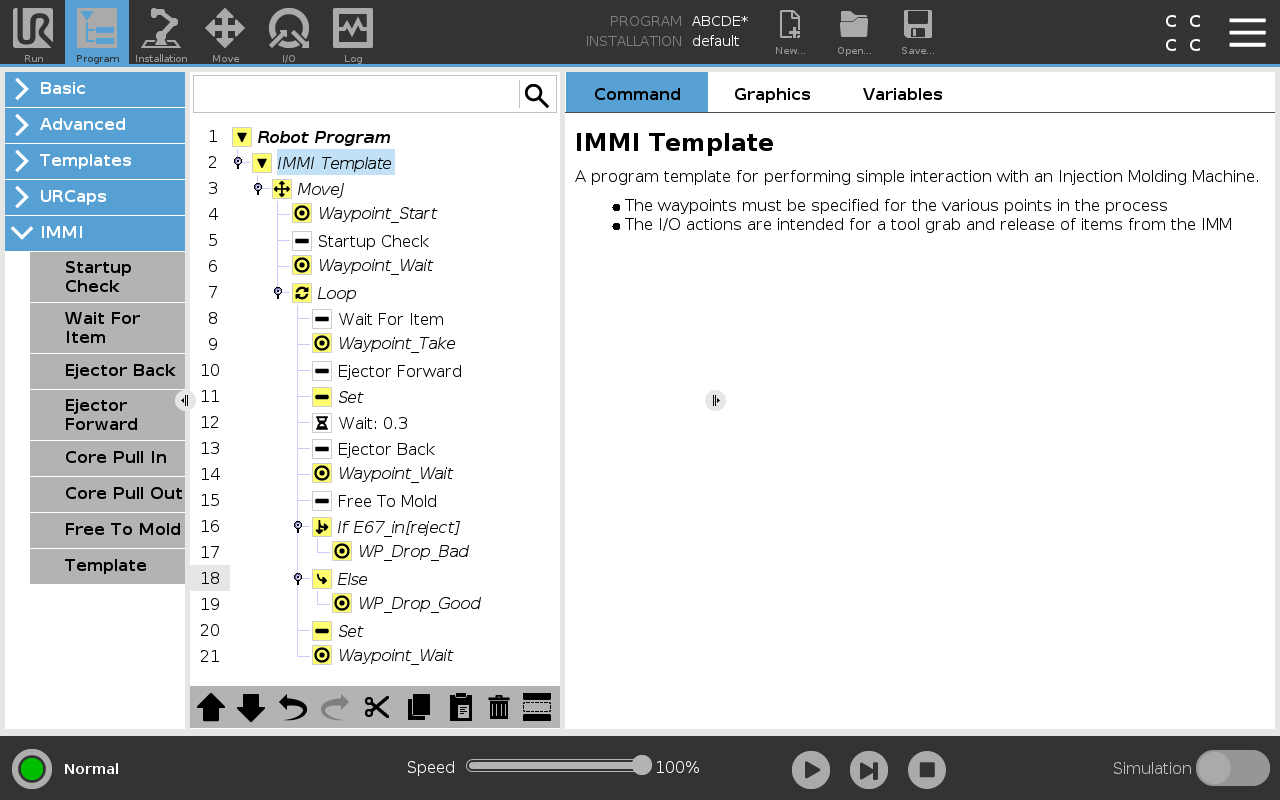
- Select Template for the program screen to appear with the template
loaded. The template structure is visible on the left side of the screen, as illustrated below.
- To prepare the robot for handling objects, select desired waypoints from the following:
- Waypoint_Start: Robot arm start point before the injection molding process begins.
- Waypoint_Wait: Robot arm wait point.
- Waypoint_Take: Robot arm remove item from IMM point.
- WP_Drop_Bad: Robot arm release rejected item point.
- WP_Drop_Good:Robot arm release accepted item point.
- Select and customize one of the following nodes to control the gripper:
- Set: Determine when the tool grips and releases an item.
- Loop: Run the robot only when an item must be removed from the IMM.
- MoveJ: Adjust the robot movement speed to fit the IMM cycle time.
- In the Move node, adjust the Joint Speed and Joint Acceleration to accommodate item fragility.
|