Remote ON/OFF control

Description

Use remote ON/OFF control to turn the Control Box on and off without using the Teach Pendant. Remote control is typically used:

  • When the Teach Pendant is inaccessible.

  • When a PLC system must have full control.

  • When several robots must be turned on or off at the same time.


Maintaining a press and hold on the power button switches the Control Box off without saving.

  • Do not press and hold the ON input or the POWER button without saving.

  • Use the OFF input for remote OFF control to allow the Control Box to save open files and shut down correctly.

Remote Control


The remote ON/OFF control provides an auxiliary 24 V supply, which remains active when the Control Box is turned off. The ON input is intended for short-time activation only and works the same way as the POWER button. The OFF input can be held down as desired. Use a software feature to load and start programs automatically.

The electrical specifications are shown below.

Terminals Parameter Min Typ Max Unit
[24V - GND] Voltage 22.8 24 25.2 V
[24V - GND] Current - - 100 mA
[ON / OFF] Inactive voltage -3 - 5 V
[ON / OFF] Active voltage 11 - 30 V
[ON / OFF] Input current 2 - 15 mA
[ON] Activation time 200 - 600 ms


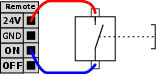
This example illustrates connecting a remote ON button.

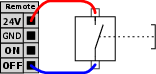
This example illustrates connecting a remote OFF button.