Each URCap can contribute multiple new functionalities to PolyScope – such functionality is generally referred to as a service. A service could be a Program Node, an Installation Node or a Toolbar.
The general principle of how a URCap is integrated into PolyScope, is shown in the diagram below.
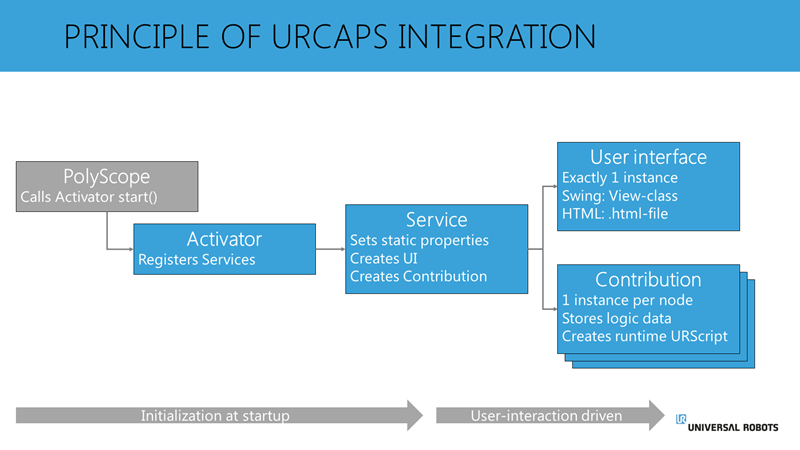 When PolyScope starts up, it looks for any installed URCaps. PolyScope then calls the Activator in each URCap, and the Activator will then register the services that should be available to PolyScope. The Activator has two overwritten methods – start() and stop(). The start() method is called when PolyScope starts, and the stop() method is called when PolyScope stops. The service sets some general properties of the URCap, such as the name of the node shown in the user interface. The Service also exposes some methods that PolyScope uses to create respectively the user interface (UI) and the contribution of each node.
In general, the settings present in the service are considered static, as they are only called at startup, and are not available for changes during runtime.
When a user inserts a type of service into a program, PolyScope calls the methods in the service in order to create this node. This will create a user interface, and a contribution. The user interface contains the visual elements, such as styling for PolyScope layouts and user interactions.
The contribution is the logic, or controller code, of the active node. There is a new instance of the contribution, for each instance of the node, active in the program. The contribution has a DataModel object, which is used to store the configuration of the node. When the user performs an action in the UI, the UI will report this to the active contribution, and the setting gets stored in the DataModel from the contribution. When the user executes the program, the contribution is responsible for generating the URScript based on the configuration of the DataModel.
When the nodes are created, and the user is interacting with it, the general activity is happening between the UI and the Contribution.


