Enabling Devices
Connecting an Enabling Device
The 3PE Teach Pendant is not included with the purchase of the OEM Control Box, so enabling device functionality is not provided.
Using a UR20, or a UR30, requires an external enabling device or a 3PE Teach Pendant when programming, or teaching, within the reach of the robot application.
See ISO 10218-2.
The OEM Control Box safely supports the following enabling device configurations:
-
3PE Teach Pendant
-
External Three-Position Enabling device
-
External Three-Position Enabling device and 3PE Teach Pendant
The standard Teach Pendant is not supported by the UR20 and UR30 robots.
The illustration below shows how to connect a Three-Position Enabling device
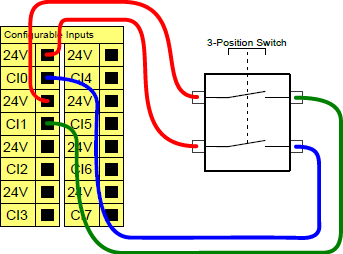
Note: The two input channels for the Three-Position Enabling Device input have a disagreement tolerance of one second.
To connect an Enabling Device to a UR-Series robot:
-
Connect a Three-Position Enabling Teach Pendant via the Control Box port (see External Device Connection Ports).
or
-
Connect a Three-Position Enabling Device (see External Device Connection Ports) and an Operational Mode Switch (see External Device Connection Ports).
For complete, in depth information about the electrical configurations, see the Electrical Interface in the UR User Manual available for download at: myur.universal-robots.com/manuals
Connecting an Operational Mode Switch
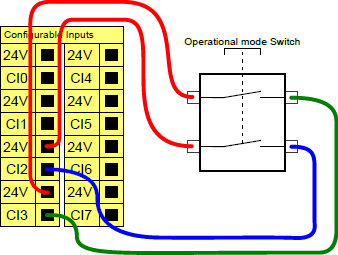
Using a Three-Position Enabling device requires the use of an Operational Mode switch.
The illustration below shows how to connect an Operational Mode switch.