Connecting Devices
To Connect a 3–Position Enabling Device
| Description |
The 3PE Teach Pendant is not included with the purchase of the OEM Control Box, so enabling device functionality is not provided. Using a UR20, or a UR30, requires an external enabling device or a 3PE Teach Pendant when programming, or teaching, within the reach of the robot application. |
|
The OEM Control Box safely supports the following enabling device configurations:
The standard Teach Pendant is not supported by the UR20 and UR30 robots.
|
|
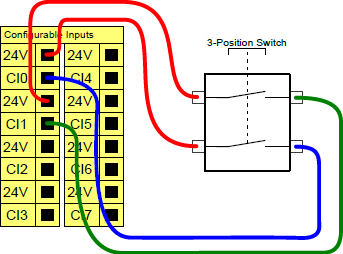
The illustration below shows how to connect a Three-Position Enabling device.
Note: The two input channels for the Three-Position Enabling Device input have a disagreement tolerance of one second.
|
|
To connect an Enabling Device to a UR Series robot |
or
|
|
For complete, in depth information about the electrical configurations, see the Electrical Interface in the UR User Manual available for download at: myur.universal-robots.com/manuals
|
To Connect an Operational Mode Switch
| Description |
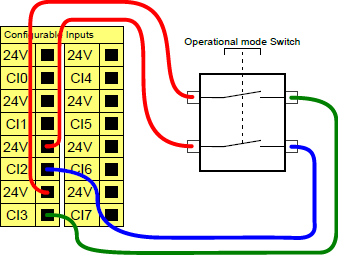
Using a Three-Position Enabling device requires the use of an Operational Mode switch.
|
|
Using a Three-Position Enabling device requires the use of an Operational Mode switch. The illustration below shows how to connect an Operational Mode switch.
|