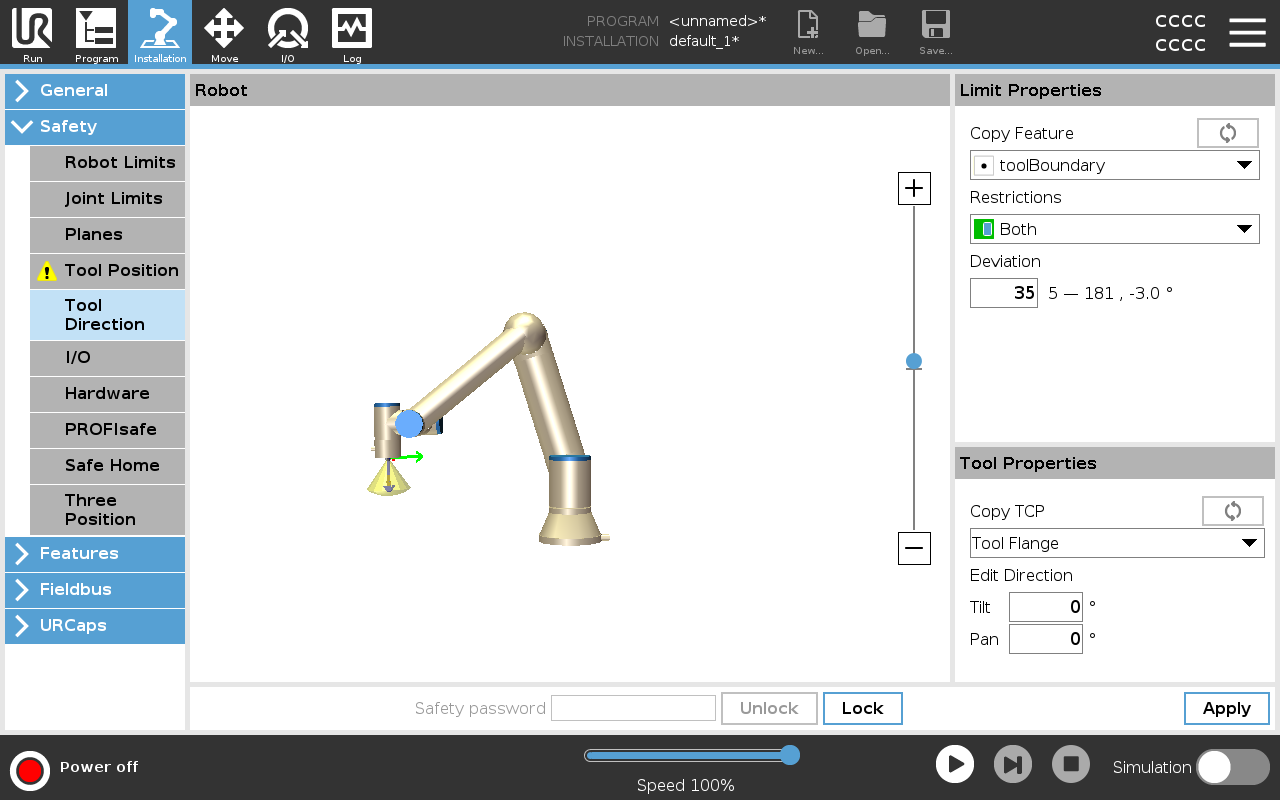
Tool Direction Restriction

Description

The Tool Direction screen can be used to restrict the angle in which the tool is pointing. The limit is defined by a cone that has a fixed orientation with respect to the robot arm Base. As the robot arm moves around, tool direction is restricted so it remains within the defined cone. The default direction of the tool coincides with the Z-axis of the tool output flange. It can be customized by specifying tilt and pan angles.

Before configuring the limit, you must define a point or plane in the robot installation. The feature can then be copied and its Z axis used as the center of the cone defining the limit.

Configuration of the tool direction is based on features. We recommend you create desired feature(s) before editing the safety configuration, as once the Safety Tab has been unlocked, the robot arm powers off making it impossible to define new features.


Limit Properties

The Tool Direction limit has three configurable properties:

  1. Cone center: You can select a point or plane feature from the drop-down menu, to define the center of the cone. The Z axis of the selected feature is used as the direction around which the cone is centred.

  2. Cone angle: You can define how many degrees the robot is allowed to deviate from center.

Disabled Tool direction limit Never active
Normal Tool direction limit Active only when safety system is in Normal mode
Reduced Tool direction limit Active only when the safety system is in Reduced mode
Normal & Reduced Tool direction limit Active when the safety system is in Normal mode as well as when it is in Reduced mode.

You can reset the values to default or undo the Tool Direction configuration by setting the copy feature back to "Undefined".

Tool Properties

By default, the tool points in the same direction as the Z axis of the tool output flange. This can be modified by specifying two angles:

  • Tilt angle: How much to tilt the Z axis of the output flange towards the X axis of the output flange

  • Pan angle: How much to rotate the tilted Z axis around the original output flange Z axis.

Alternatively, the Z axis of an existing TCP can be copied by selecting that TCP from the drop-down menu.