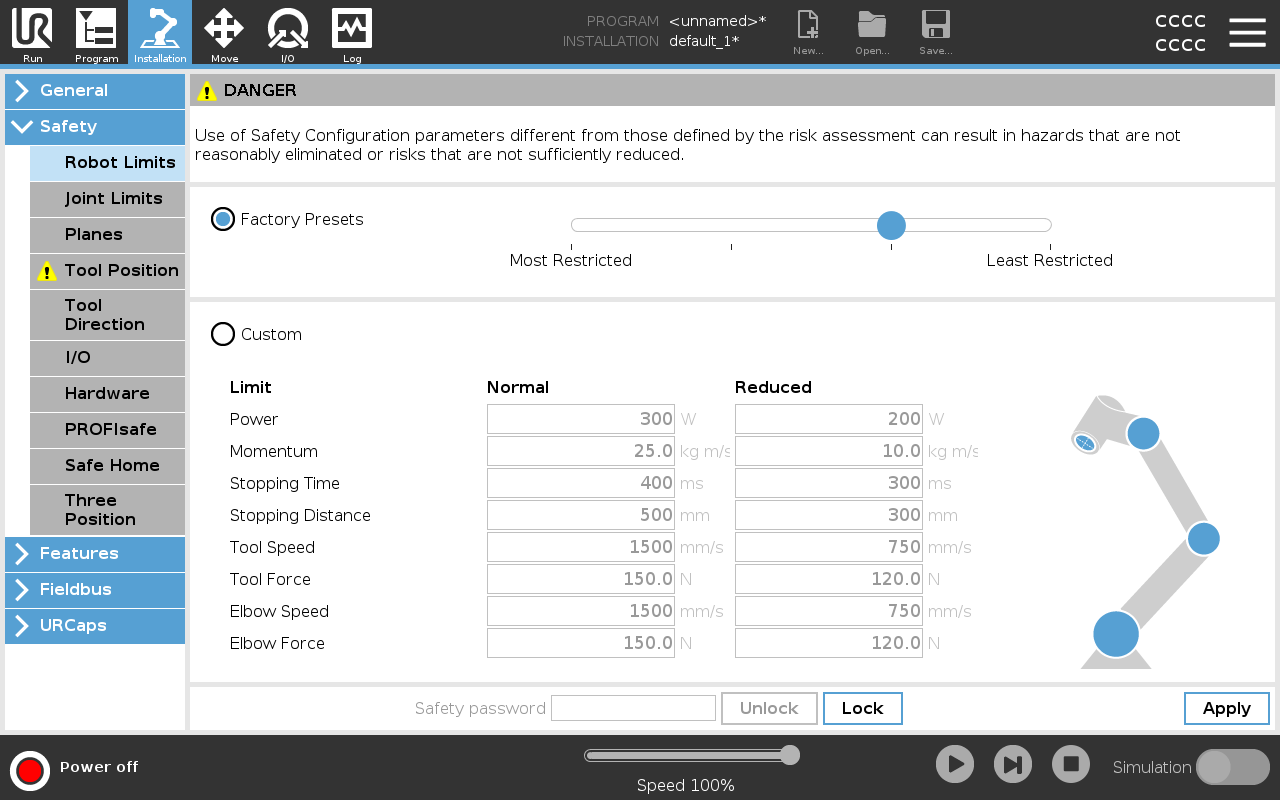
Robot Limits

Description

Robot Limits restrict general robot movements. The Robot Limits screen has two configuration options: Factory Presets and Custom.


Factory Presets

Factory Presets is where you can use the slider to select a predefined safety setting . The values in the table are updated to reflect the preset values ranging from Most Restricted to Least Restricted

Slider values are only suggestions and do not substitute a proper risk assessment.


Custom

Custom is where you can set Limits on how the robot functions and monitor the associated Tolerance.

Power Limits maximum mechanical work produced by the robot in the environment. This limit considers the payload a part of the robot and not of the environment.
Momentum Limits maximum robot momentum.
Stopping Time Limits maximum time it takes the robot to stop e.g. when an emergency stop is activated.
Stopping Distance Limits maximum distance the robot tool or elbow can travel while stopping.
Restricting stopping time and distance affect overall robot speed. For example, if stopping time is set to 300 ms, the maximum robot speed is limited allowing the robot to stop within 300 ms.
Tool Speed Limits maximum robot tool speed.
Tool Force Limits maximum force that the robot tool exerts on the environment to prevent clamping situations.
Elbow Speed Limits maximum robot elbow speed.
Elbow Force Limits maximum force that the elbow exerts on the environment to prevent clamping situations.
 

The tool speed and force are limited at the tool flange and the center of the two user-defined tool positions.

You can switch back to Factory Presets for all robot limits to reset to their default settings.