|
Conditional blend trajectories
|
This example is a very situational example, but it shows that the robot program may in a very rare situations calculate program nodes before execution.
The blend trajectory is affected both by the waypoint where the blend radius is set and the following
one in the program tree.
In this example, the blend around is affected by (WP_1) and (WP_2).
The consequence of this becomes more apparent when blending around (WP_2) in this example.
There are two possible ending positions and to determine which is the next waypoint to blend to, the robot
must evaluate the current reading of the digital_input[1] already when entering the blend radius.
That means the if...then expression is evaluated before we actually reach
the destination which is somewhat counter-intuitive
when looking at the program sequence. If a waypoint is a stop point and followed by conditional expressions
to determine the next waypoint (e.g. the I/O command) it is executed when the robot arm has stopped at the
waypoint.(WP_2)
MoveL
    WP_I
    WP_1 (blend)
    WP_2 (blend)
    if (digital_input[1]) then
        WP_F_1
    else
        WP_F_2
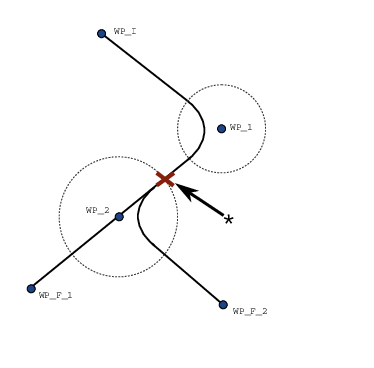
14.2: WP_I is the initial waypoint and there are two potential final waypoints WP_F_1 and WP_F_2, depending on a conditional expression. The conditional if expression is evaluated when the robot arm enters the second blend (*).
|