Remote ON/OFF Control and Emergency Stop
| Description |
The OEM Control Box requires a remote ON/OFF control and an emergency stop push-button. The following sections describe how to install them using the I/O ports.
|
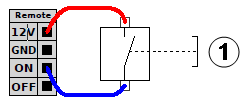
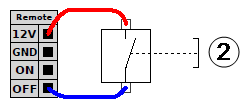
Connecting the ON/OFF Control
|
The images below shows how the remote ON/OFF control is connected.
|
Connecting the Remote Emergency Stop
| Description |
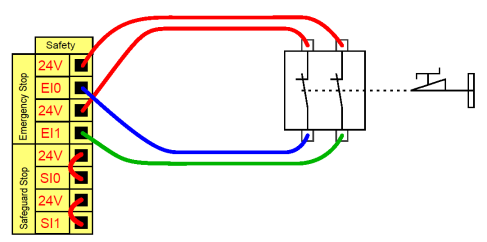
Install an external Emergency Stop (E-stop) if the Teach Pendant with the default Emergency Stop is not connected to the Control Box. |
|
The following illustration shows the minimum required Emergency Stop installation.
|