Modules and Global Functions
| Description |
this is linked to Threads command
Spend less time programming by reusing functionality and reduce deployment times by creating template programs.
Functions can now call other functions as deeply nested as you like. This in turn limits the nesting in the program tree, making it easier to read and maintain.
|
|
|
Modules as namespaces or grops of categories for a function.
|
|
|
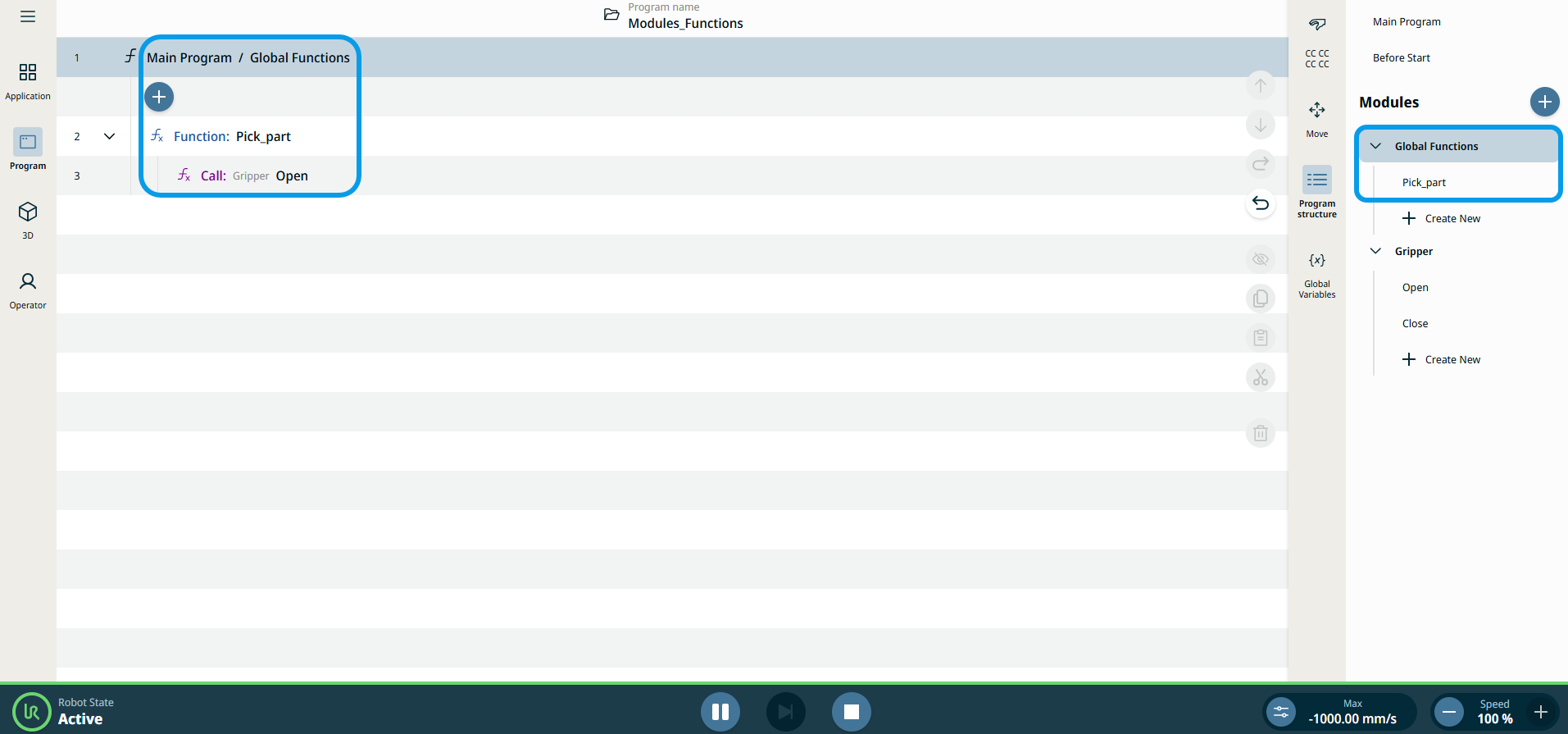
In the multisk screen, tap the Modules add icon and a module tree is inserted under Global GFunction. Tap the Module kebab icon, and choose Rename. Type the Module name as Gripper, and Confirm. This gathers together all the functionality of different function for a gripper that you want to create. Tap + Create New to create a function underneath Gripper module, rename that as Open, and Confirm. Repeat the step above to create a second function for the Gripper and name it as Close. In the main screen, you can see in the main program the gripper module with and open and close function. That way you can implement the functionaltiy in your open function. I’s asmal ggatnhering. The benefit is that you are only viewing the functionality of that one function. It’s not blurred by the entire program and having to figure out where it’s hapoopwning. A function can call another function.
Tap Program icon in the main program and select Set command. Under the Source foiled, choose Tool IO. Choose DO 0 as signal and Low in the Value field. Tap Wait command and type 1 in time Tap Paylog command
GLOBAL FUNCTIONS Tap the kebab icon, and choose Rename. Type the Function name as Pick_part, and Confirm. THis is usedful if you consider a CNC machine. Pick_part moves the robot in a sense to pick out the part and open the gripper, then close it again. Tap Program icon in the main program and select Call command. In the Module field, choose Gripper. In the Function field choose open. A Go to Implementation biutton appears.
Tap Main Program in the multitask screen. Tap Call command , Global Functions in Module, Select Pick_part function.
BENEFITS: Saves yime everytime user wants to do programming that needs to do an open. You can see that the main program screen is not cluttered with all the program nodes for picking a part and opening anclosing a gripper. If user want to change the functionality, then user just have to got to oine function and it will be applied everywhere in the program.
|
|
|
|